
Install the Ritzo mobile casino app from your browser
Ritzo mobile casino is our casino for phones, with an app you install directly from your browser: two steps in Google Chrome, four in Safari. The app gives you access to our tournaments, loyalty programme and personal bonuses.
18+ Play responsibly · Check your local laws
Open our app installation page on your phone and follow the guide for the browser you’re using. The installation starts in the browser; our guides don’t direct you to a separate app store. Installing the app doesn’t enter you in a tournament or activate a bonus. We apply the rules of each tournament or offer separately.
What you get in Ritzo on your phone
Ritzo tournaments
We run Gatsby’s Daily Gold Rush Tournament on slots. Once you’ve made at least one completed deposit, you can enter by playing any slot with real money at a stake that meets the tournament minimum. Eligible play enters you automatically, so there’s no separate tournament sign-up.
We award points for spins, and each daily round runs from 00:00 to 23:59 CEST. We pay out the tournament prizes in coins within 48 hours.
The Ritzo loyalty programme
We award loyalty points for slot bets made with your real-money balance. Bets made with bonus funds don’t count towards your progress, and neither do table games, including live tables. The programme groups its levels into stages, with different reward terms at each stage.
- 101loyalty levels
- 11programme stages
- €15 in eligible slot stakes per point we award
- 2,834free spins available across all stages
We award each level reward only once, usually within 24 hours of reaching the level. If your reward includes free spins, you have seven days to both activate and use them.
Personal bonuses at Ritzo
We offer personal bonuses in the app. Before activating one, check when it expires, how much you need to wager and which games count towards that requirement. Don’t assume that the terms of a previous bonus also apply to a new offer.

Ritzo mobile casino loyalty programme
Rewards as you level up
101 levels
We offer free spins through our loyalty programme. The wagering requirement and winnings cap depend on your stage.
18+ Play responsibly
How to install Ritzo in Google Chrome
We provide a Chrome guide on our app installation page. Open that page in Google Chrome on your phone so you can follow the instructions in the browser you’ll use to install the app. The page itself has an “Install” button, and the mobile menu has an “Install the app” block with an “Install now” button.
-
Tap the button in Chrome
Keep our installation page open and tap the button at the top right of the browser.
-
Install the Ritzo app
Tap “Install” to start installing our app.
If you don’t see the option, check that you’ve opened our installation page in Chrome and are following the Chrome guide rather than the Safari one.
Installing Ritzo in Safari in four steps
We provide separate steps for Safari on the same installation page, and they are longer than the Chrome ones. Open the page in Safari on your phone, switch to the Safari tab and follow the four steps in order.
-
QR code
Scan the QR code with your device.
-
The “Share” menu
Open the “Share” menu.
-
Home Screen
Tap the “Add to Home Screen” button.
-
Add the icon
Tap “Add”.
In Safari you won’t look for an “Install” button: the guide takes you through the “Share” menu and the “Add to Home Screen” option.
What the Ritzo mobile casino looks like on a phone
The home page on mobile
At the top you see the Ritzo logo, a “Log in” button and a registration button with a key icon. Below them are the offer carousel, a “Search” field and a row of category tiles, including Home, Popular, Ritzo Tournament, Hot and Best provider.
A fixed bar at the bottom of the screen has five items: Menu, Home, Sign up, Promotions and Search.

The menu: promotions, tournaments, shop and chat
You open the menu with the “Menu” button in the bottom bar. At the top are the language selector and the “Log in” and “Sign up” buttons, followed by Home, Promotions, Tournaments, Shop, Achievements, Loyalty club and Live Chat.
Below them are links to the terms, privacy policy, responsible gaming, bonus terms, About us, FAQ and contact, and at the very bottom sits an “Install the app” block with an “Install now” button. The frames show the mobile layout of the page.
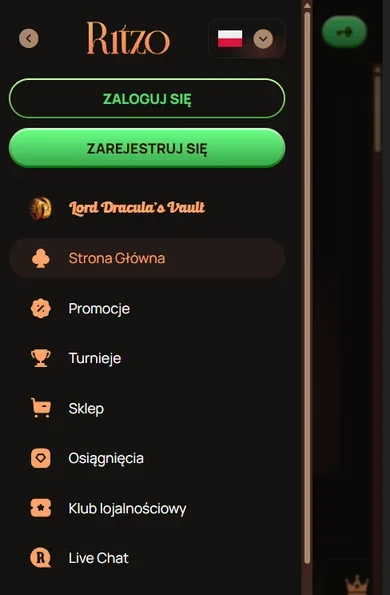
Ritzo on your phone
Install from your browser
Chrome and Safari
Two steps in Chrome, four in Safari. We cover both browsers on our installation page.
18+ Play responsibly
Can you play Ritzo mobile casino without the app?
Access from your phone
Ritzo mobile casino already works in your phone’s browser, and you install the app when you want the casino behind an icon on your screen. The layout is optimised for touch, with quick filters, large buttons and fast search.
Deposits, withdrawals, bonuses and support are available on your phone, and you can start on one device and carry on with another.
Your Ritzo account, cashier and play limits
- Account: If you already have an account with us, log in instead of registering again.
- Cashier: Our minimum withdrawal amount depends on the payment method. See our withdrawals page for the rules before submitting a request.
- Limits: We offer deposit limits, reminders about time spent playing and the option to take a break. See our responsible gambling page for details.
If you can’t remember your password, use the reset option on the login screen. We’re also available around the clock by live chat and at [email protected].
Questions about the Ritzo mobile casino app
How do I install the Ritzo app?
Open our installation page in Chrome or Safari. In Chrome, tap the button at the top right of the browser and then “Install”. In Safari, follow four steps: scan the QR code, open the “Share” menu, tap “Add to Home Screen” and then “Add”.
Can I install Ritzo mobile casino from Safari?
Yes. We provide a Safari guide on the Safari tab of our installation page. It is separate from the Chrome one, has four steps and starts with a QR code.
Where do I find the install button on my phone?
The installation page has an “Install” button, and the mobile menu has an “Install the app” block with an “Install now” button at the very bottom. You open the menu with the “Menu” button in the bottom bar.
Is there a charge to install the Ritzo app?
We don’t list installation charges in our guide. If you have a question about a charge before confirming installation, ask us via live chat.
How do I remove the Ritzo app from my phone?
We can help if you’re unsure how to remove it. Email us at [email protected] and tell us which phone and browser you used to install it.
Does the Ritzo app work on iOS and Android?
We provide installation guides for Chrome and Safari rather than a device compatibility list. Start with the guide for the browser you use on your phone.
Availability depends on your location. We only allow adults aged 18 or over to play. Play responsibly.